
We tested BillyBox and Gennai on the same Gmail inbox. The results were dramatic.
Published April 2026 · Updated August 2026 · Real test on arbiro@gmail.com
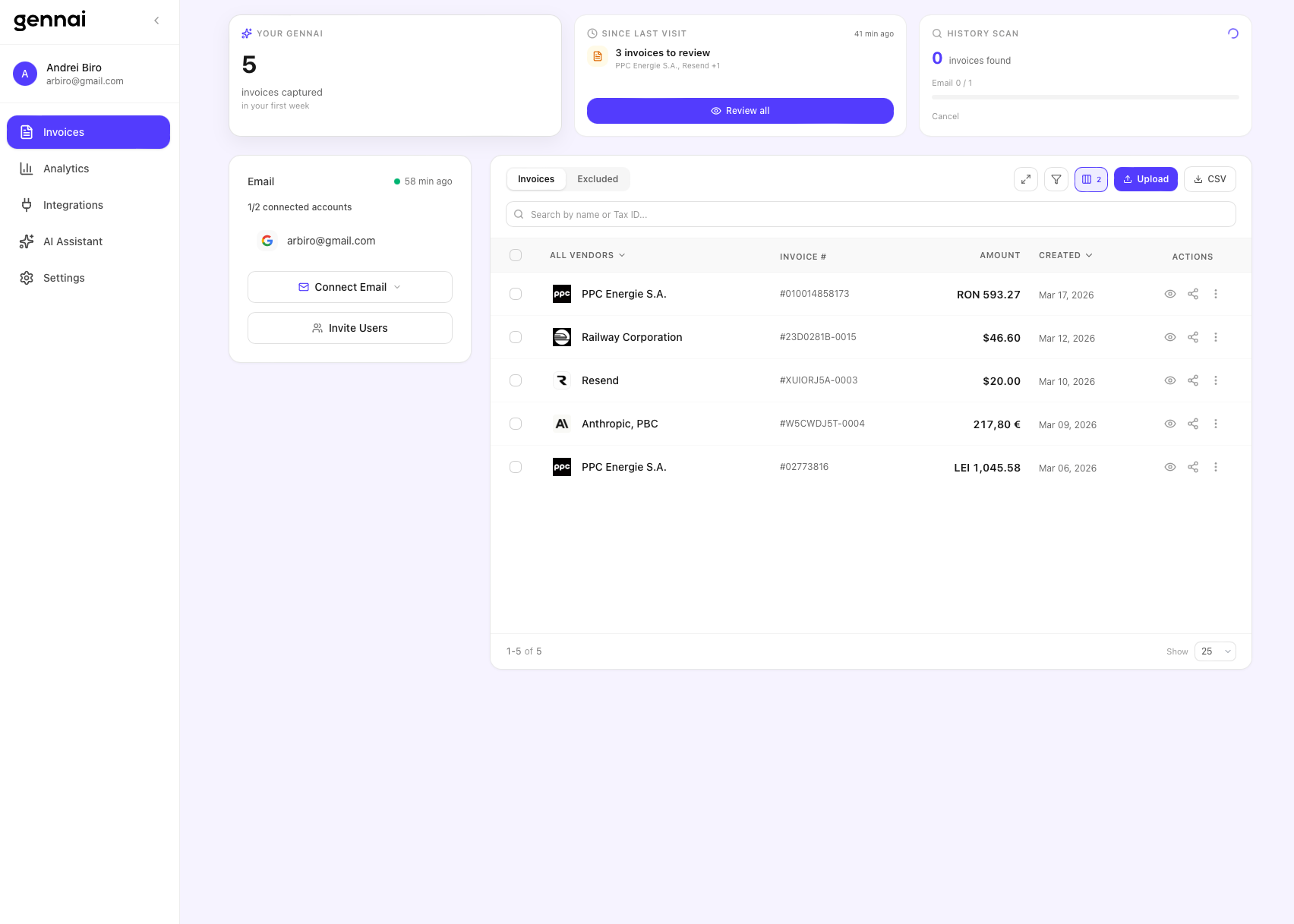
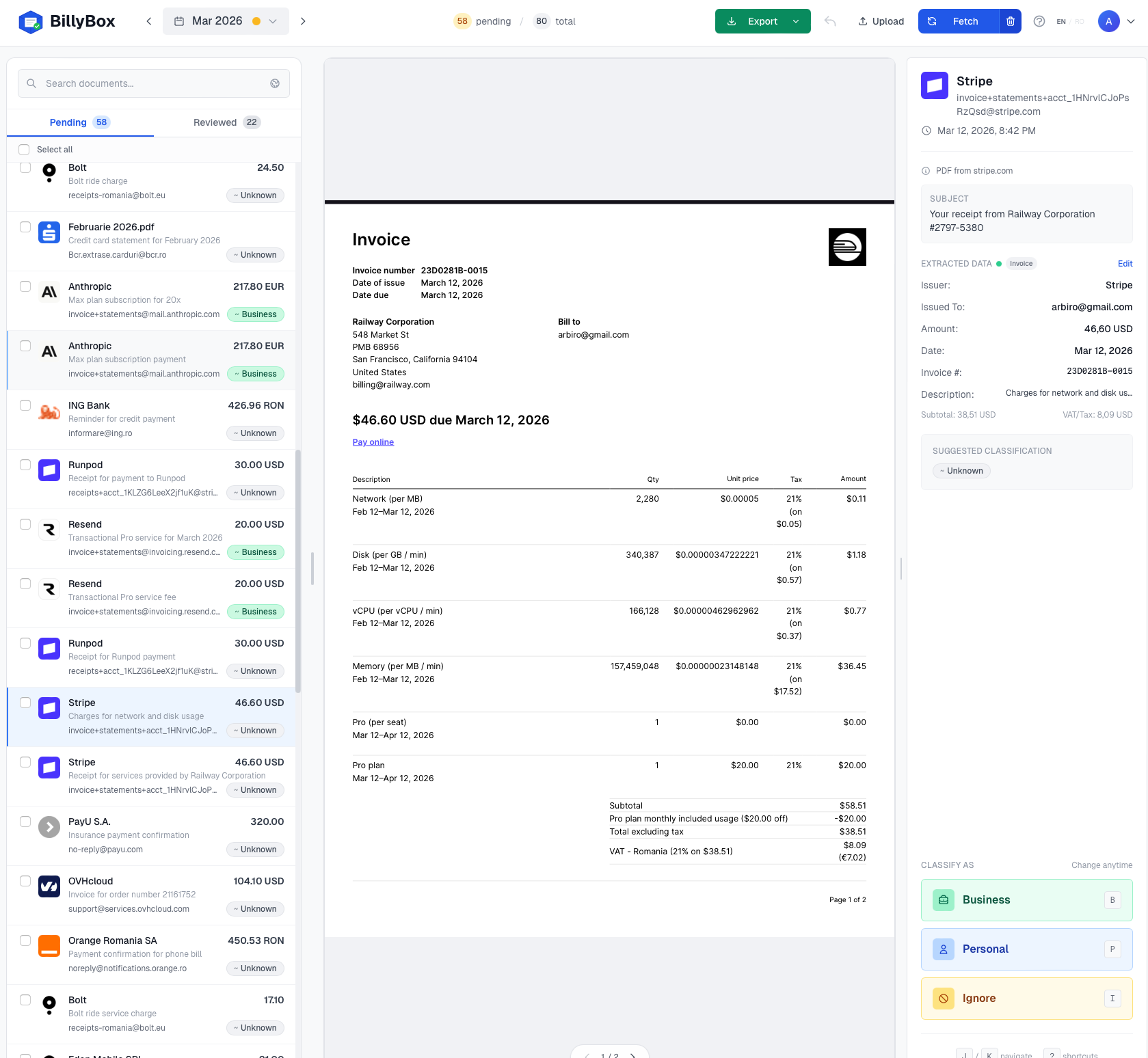
Quick answer: We connected the same Gmail account to BillyBox and Gennai for the same month (March 2026). BillyBox surfaced 80 documents from 34 vendors; Gennai found 5 — a ratio specific to that inbox. The gap comes from portal-link downloads, PDF generation from attachment-less payment emails, AI vision on scanned images, and hidden attachments that PDF-only scanners miss.
We connected the same Gmail account to both platforms and compared what each one finds for March 2026. No tricks, no preselection — same inbox, same month, two different tools.
Gennai — 5 invoices found
BillyBox — 80 documents found
The results: March 2026
| Metric | BillyBox | Gennai |
|---|---|---|
| Documents found | 80 | 5 |
| With extracted amounts | 56 | 5 |
| Unique vendors detected | 34 | 3 |
| Currencies detected | RON, USD, EUR, CAD, ALL, LEI | RON, USD, EUR |
| Document types | PDF, images, emails, XML | PDF only |
| Invoices without attachments (email body) | Yes — auto-generates PDF | No |
| Downloads from portals | Yes (Bolt, etc.) | No |
| Credit-based pricing | No — unlimited invoices | Yes — 75/month on Starter ($12/mo) |
Why such a big difference?
The gap comes down to how each platform processes emails. Gennai primarily looks at direct PDF attachments. If your invoice comes as a portal link, a scanned image, or a payment notification in the email body — Gennai misses it. These are exactly the formats that turn into lost invoices in your email at tax time.
BillyBox takes a much more aggressive approach:
- PDF and XML attachments — standard detection, both platforms do this
- Scanned images (JPG, PNG) — AI-powered OCR for photographed or scanned receipts
- Portal downloads — when the email contains an invoice link (not an attachment), BillyBox downloads it automatically
- PDF generation from email body — for payment notifications without attachments (Stripe, Runpod, etc.), BillyBox generates a PDF from the email content
- Advanced MIME analysis — detects hidden attachments that email clients don't show
Pricing: credits vs unlimited
Gennai runs on a credit system. Their Starter plan ($12/month) gives you 75 invoices per month. If you have more, you pay more. Growth ($29/month) offers 250.
BillyBox has no credits. The free plan gives you 2 months, paid plans unlock all months — but there is no per-invoice limit. The 80 documents found in March 2026 cost nothing extra. On Gennai, you would have exceeded the Starter limit after the first week.
Classification: manual vs intuitive
Gennai requires you to go through each invoice and manually tag it with custom labels. Flexible, but slow.
BillyBox simplifies this with three clear categories: Business, Personal, and Ignored. On desktop, press B, P, or I. On mobile, swipe. 80 invoices classified in under 5 minutes.
Export: what your accountant gets
BillyBox exports an organized ZIP with separate folders for business and personal, plus a CSV summary with all extracted data. Gennai offers CSV export and Xero/QuickBooks sync.
If you work with an accountant who wants a sorted folder of invoices — BillyBox is built exactly for that. If you need direct Xero integration — Gennai is better suited.
Conclusion
Both tools have their place. Gennai is a solid platform for enterprise teams with ERP integration needs — see our full BillyBox vs Gennai feature comparison for the details. But if you are a freelancer, sole proprietor, or small business and you want to extract all invoices from email without missing any — the difference is clear.
80 vs 5. Same inbox. Same month.
Try BillyBox free and see how many invoices it finds in your inbox.
FAQ
What was the test setup?
Same Gmail inbox, same calendar month, both tools connected with read-only OAuth. We measured how many real invoices and receipts each tool surfaced for accountant review — without per-document fees gating the result. BillyBox returned 80 documents from 34 vendors. The comparison tool returned 5.
Why such a big gap?
Most invoice tools index PDF attachments only. BillyBox additionally (a) follows portal links in the email body and downloads the document, (b) generates a clean PDF from text-only payment notifications (Stripe, OpenAI, Cloudflare), (c) runs AI vision on scanned images and JPG/PNG receipts, and (d) catches MIME attachments that mail clients sometimes hide. Each of those mechanisms ships invoices that an attachment-only scanner cannot see.
Does this hold up on inboxes other than the test one?
The exact 80-vs-5 ratio is specific to that inbox. The structural gap (portal links, PDF generation from text emails, vision OCR, hidden MIME) reproduces on any inbox that has SaaS or platform vendors. Freelancers who pay Stripe, AWS, Google Cloud, OpenAI or Bolt typically see the largest gap.
What does the cost difference look like?
BillyBox charges a flat €9.99/mo (Starter) or €19.99/mo (Pro) with unlimited invoices — 80 documents cost no more than 8. Tools that charge per invoice or per credit can easily multiply that by 10x for the same month. The free tier covers two full calendar months end-to-end so you can verify the gap yourself before paying.
How much does BillyBox cost?
The free plan covers 2 months. Paid plans start at €9.99/month with unlimited invoices.
Does BillyBox have a per-invoice limit?
No. Unlike Gennai which runs on credits (75-750 invoices/month), BillyBox processes unlimited invoices on any plan.
What types of invoices does BillyBox detect?
PDF, XML, scanned images (JPG, PNG) via OCR, invoices from email body, and automatic downloads from vendor portals.
Can I use BillyBox with Gmail and Outlook?
Yes. BillyBox supports Gmail, Outlook/Hotmail/Live (OAuth), Zoho, and any IMAP server.